We participate in afiiliate platforms. Click to view our full disclosure.
Suppose you’re asking Google to ” give me a prompt for ChatGPT images “. In this article, I clearly explain how to write an effective prompt to generate high-quality images using ChatGPT. Also, I will give the prompt for creating engaging videos using Google Gemini.
Simple steps tho nerchukondi.
Why AI Videos Are Going Viral
Instagram lo prati rojoo lakshala Reels upload avutunnayi. Kabatti, mee video viewers ni first few seconds lone attract cheyyadam chala important. Instagram algorithm kuda viewers behavior ni observe chestundi. Evaraina mee Reel ni stop chesi complete ga chusthe, like chesthe, share chesthe, leda comment chesthe, Instagram aa video ni inka ekkuva mandiki recommend chese avakasam untundi.
AI videos ki ee rojullo chala demand undataniki main reason, avi choodagane attractive ga kanipistayi. Bright colors, smooth animations, interesting stories, funny characters, mariyu professional-looking scenes valla viewers attention easy ga capture avutundi. Mukhyanga cartoon-style AI videos chala mandi complete ga chustunnaru, kabatti watch time kuda perugutundi.
AI videos create cheyadaniki expensive cameras, high-end editing software, leda professional video editing skills avasaram ledu. ChatGPT, Google Gemini, mariyu AI video generation tools use chesi, simple prompts tho kuda quality content create cheyyachu. Regular ga engaging AI videos upload chestu unte, mee Instagram page reach, engagement, mariyu followers kuda gradual ga improve avuthayi.
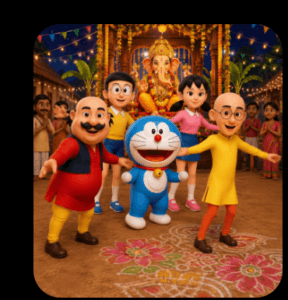
How To Create Motu Patlu Dance Videos
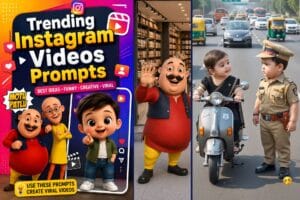
Meeru Motu Patlu dance videos create cheyyali anukunte E la nenu ichina vidhanga prompts ichi, videos create chesukovachu.
Step 1: ChatGPT Website Open Cheyyandi
Munduga mee mobile leda computer lo browser open chesi chatgpt.com website ki vellandi. Meeku account lekapothe free ga signup cheyyachu. Already account unte login avvandi.
ChatGPT open ayyaka New Chat meeda click chesi, kindha nenu ichina prompt ni copy chesi paste cheyyandi. Tarvata Send button meeda click cheyyandi.
AI konni seconds lo complete story, scenes, image prompts, video prompts, dialogues anni generate chestundi.
Step 2: Google Gemini Open Cheyyandi
Ippudu browser lo gemini.google.com website open cheyyandi. Google account tho login avvandi.
ChatGPT generate chesina output ni copy chesi Gemini lo paste cheyyandi. Meeku kavalsina changes kuda simple ga type cheyyachu.
Udaharanaki:
- Dance movements inka natural ga cheyyi.
- Background village festival laga marchu.
- Camera movements cinematic ga undali.
- Lighting bright ga undali.
- Characters smiling tho dance cheyyali.
Gemini mee instructions prakaram prompt ni improve chestundi.
Step 3: Image Prompt Generate Cheyyandi
Ippudu browser lo gemini.google.com website open cheyyandi. Google account tho login avvandi.
ChatGPT generate chesina output ni copy chesi Gemini lo paste cheyyandi. Meeku kavalsina changes kuda simple ga type cheyyachu.
oka detailed image prompt create chesthe, images anni same style lo untayi.
AI Images Create Cheyyandi
Image prompts ready ayyaka, meeku nachina AI image generation tool lo aa prompts ni use chesi images generate cheyyandi.
Images generate ayina tarvata prati scene ni check chesi, characters same ga unnaya, background correct ga unda ani verify cheyyandi.
Motu Patlu Image Prompt
Step 5: Images Ni Video Ga Marchandi
Images ready ayyaka, AI video generation tool lo upload cheyyandi.
Video prompt lo ilanti instructions ivvachu:
- Characters natural ga dance cheyyali.
- Smooth camera movement undali.
- Facial expressions clear ga undali.
- Body movements realistic ga undali.
- Background lively ga undali.
- High quality cinematic animation kavali.
Ilanti detailed prompts ivvadam valla video quality chala improve avutundi.
Video Prompt
Use Cartoon-Style Videos to Grab Attention
One trend that has become very popular is creating short cartoon-style AI videos. Bright colors, expressive characters, and funny conversations often encourage viewers to stop scrolling and watch the entire Reel.
Many creators make entertaining videos inspired by the playful style of shows such as Motu Patlu because that kind of colorful animation appeals to a wide audience. If you’re creating content for public or commercial use, it’s important to avoid using copyrighted characters directly. Instead, create your own original cartoon characters with a similar fun, energetic, and family-friendly style.
For example, if you sell kitchen products, two original cartoon friends could demonstrate how the product works. If you own a clothing store, animated characters could introduce new collections in a humorous way. This style feels entertaining while still delivering your marketing message.
People usually remember stories better than advertisements. A short, funny conversation between animated characters often creates more engagement than simply showing a product.
Also Read:
Give Long Prompts Instead of Small
Example Prompt
Create a 30-second Instagram Reel about a cartoon shop owner explaining the benefits of a portable blender. Divide the story into six scenes. Include funny dialogue, expressive character actions, camera movements, and detailed image prompts for each scene. Use colorful 2D cartoon illustrations with bright lighting.
ChatGPT can generate:
- Story ideas
- Scene breakdowns
- Character descriptions
- Narration
- Dialogue
- Camera directions
- Image prompts
This gives you a complete storyboard before you begin creating visuals.
Keep Your Videos Short
Instagram users make decisions quickly.
Try to grab attention within the first three seconds.
Most successful Reels are between 15 and 45 seconds long.
Instead of explaining everything in one video, create a series that encourages viewers to come back for the next part.
Write Better Prompts
The quality of your AI video depends on the quality of your prompts.
When writing prompts, include:
- Character details
- Clothing
- Expressions
- Location
- Lighting
- Camera angle
- Mood
- Art style
- Animation style
- Video duration
The more information you provide, the better the AI understands your vision.
Common Mistakes to Avoid
Avoid these mistakes when creating AI videos:
- Using very short prompts
- Making videos too long
- Adding too many animations
- Ignoring subtitles
- Changing characters between scenes
- Uploading low-quality videos
- Forgetting a clear call to action
Small improvements in each video can lead to much better results over time.